澳大利亚墨尔本留学生作业代写范文

SIT328 TechnicalReport 技术报告
本作业是我们最近刚代写的澳大利亚墨尔本社区学院essay代写的一个范文,由于时间紧促,我们安排的一个具有博士学位的老师在短短3天中完成的,并顺利通过turnitin剽窃检测。澳洲作业代写是本站的一个特色代写服务项目,从博士到硕士和本科以及预科的作业代写都可以一站式解决。墨尔本社区学院正在用一个现代化的基于网络的平台替换其使用了15年的内容管理系统(CMS)。本报告旨在概述CMS重建项目的目标、范围、假设、系统功能、用户需求和测试计划。该项目旨在提供一个直观、响应迅速且只需极少培训即可使用的界面,使所有用户群体都能轻松访问课程安排、内容和服务。
本essay目录
1. 引言 1
1.1. 目的和目标 1
1.2. 项目范围 1
1.3. 假设 2
2. 系统特性和需求 2
2.1. 系统特性 2
2.2. 特性描述 3
2.3. 功能需求 4
2.4. 非功能需求 5
3. 用户需求 7
3.1. 用户画像 7
画像 1 – 设施维护员 7
像 2 – IT 支持技术员 8
3.2. 用户故事 8
画像 1 – 设施维护员的用户故事 8
画像 2 – IT 支持技术员的用户故事 9
通用用户故事 9
3.3. 用例图 9
4. 测试计划(质量保证) 11
4.1. 待测特性 11
4.2.测试方法 11
4.3 时间安排 12
4.4 角色与职责 12
5. 结论 13
6. 参考文献 13
Table of Contents
1. Introduction 1
1.1. Purpose and Objectives 1
1.2. Project Scope 1
1.3. Assumptions 2
2. System Features and Requirements 2
2.1. System Features 2
2.2. Description of Features 3
2.3. Functional Requirements 4
2.4. Non-Functional Requirements 5
3. User Requirements 7
3.1. User Personas 7
Persona 1 – Facilities Maintenance Officer 7
Persona 2 – IT Support Technician 8
3.2. User Stories 8
User Story for Persona 1 – Facilities Maintenance Officer 8
User Story for Persona 2 – IT Support Technician 9
General User Stories 9
3.3. Use Case Diagrams 9
4. Test Plan (Quality Assurance) 11
4.1. Features to be Tested 11
4.2. Testing Methods 11
4.3. Timeframes 12
4.4. Roles and Responsibilities 12
5. Concluding Statements 13
6. References 13
1.Introduction
1.1.Purpose and Objectives
The Community College in Melbourne is replacing its 15-year-old Content Management System (CMS) with a modern, web-based platform. The purpose of this report is to outline the objectives, scope, assumptions, system features, user requirements, and test plan for the CMS redevelopment project. The project aims to provide an intuitive, responsive interface that requires minimal training, making it easy for all user groups to access schedules, content, and services.
1.2.Project Scope
The project scope defines the boundaries of the CMS redevelopment.
Core CMS Functionality: Implementation of all existing CMS features (such as user authentication, timetabling, grades, etc.) plus new modules for messaging/announcements, room and equipment booking, maintenance requests, event calendar, online content storage, and an integrated school email system.
Data Migration: Migrating existing user accounts, timetables, grades, records, and content from the old CMS to the new system before deployment.
System Integration: Connecting the CMS to necessary external services (e.g. Outlook/Gmail for email, student information systems) to avoid duplication.
Role-Based Access: Defining and implementing access controls so different user groups (students, teachers, parents, admin, facilities, IT) see only their relevant data.
Training and Documentation: Developing user guides, conducting workshops, and distributing a one-page flyer (as planned) to introduce the new features to all stakeholders.
Deployment and Go-Live: Installing the CMS on the college’s servers (or cloud environment) and managing the transition to live use, including final data migration and scheduled go-live date before Term 1 2026.
1.3.Assumptions
This plan is based on several key assumptions about the environment and constraints. For example, infrastructure availability is a critical assumption where the school will provide, or upgrade server infrastructure and network capacity as needed. The technical report also assumes reliable Internet access and that any necessary hardware is provisioned. The project also assumes to have sufficient budget and personnel allocated for the timeline. Funding constraints or staffing shortages are not anticipated to cause delays. If any of these assumptions do not hold (for example, if network upgrades are required or stakeholders are unavailable), the project scope and schedule may need to be revisited.
2.System Features and Requirements
2.1.System Features
The new CMS will include the following major features, corresponding to stakeholder needs identified in the scenario.
Messaging and Announcement Portal: A central communication module where administrators and teachers can send announcements and messages to select groups. Notifications will be pushed via email and on-screen alerts.
Class Timetable Access: Each student and teacher can view their schedule of classes/activities. Timetables will be synchronised with enrolment data and updated dynamically.
Room and Equipment Booking: A reservation system for school rooms and shared equipment. Authorised users can select time slots and view availability.
Maintenance Request System: A workflow for facilities issues. Teachers or staff can submit a maintenance request with details. Facilities staff can view, assign, update, and close work orders.
Event Calendar and News Board: A public calendar of school events and a news board for itemised posts (e.g. club notices, holiday announcements). Users can view events by date.
School Email Client: An integrated email system (or integration with Outlook/Gmail) to allow users to send messages to other school users without leaving the CMS. This supports the migration plan for a new email system within the CMS.
Online Content Repository: Secure file storage where teachers and administrators can upload and organise documents like syllabus and learning materials. Students and parents can access permitted documents through their portal.
User and Access Management: Admin interface to create user accounts, assign roles, and manage permissions.
Responsive Web Interface: A user interface optimized for desktops, tablets, and smartphones so stakeholders can access CMS features from various devices and browsers.
These features together unify all school information services. In particular, the messaging, booking, and maintenance modules represent significant enhancements over the old system.
2.2.Description of Features
Messaging and Notifications: The CMS will have a built-in messaging system. Teachers and administrators can compose announcements or emails within the system, selecting target audiences (all students, a class, specific staff). When a message is posted, recipients will see in-app notifications and receive emails. This replaces manual email lists and bulletin boards with a single platform. Over time, it is anticipated this will strengthen communication across the school community.
Timetable Viewer: Upon login, students and teachers will see their daily or weekly class schedules. The system automatically generates timetables from the master schedule database. Users can filter by week, day, or subject. This ensures all users have up-to-date schedule information and removes reliance on static printed timetables.
Bookings Module: Users with permission (typically teachers and administrators) can reserve rooms and equipment. A calendar interface will show availability by day/time; users select an item and time slot and submit a booking request. The system will prevent conflicts (overlapping bookings) and send confirmation or rejection notifications. Administrators can also override and manage bookings centrally.
Maintenance Requests: Staff can report facility issues by filling out an online request form (specifying location, urgency, and a description). Once submitted, the request becomes a work order visible to facilities staff. Facilities personnel can update the status (e.g. “in progress,” “completed”) and add notes. Users are notified when their request is acknowledged or resolved. This workflow replaces email requests and paper forms with a transparent system that tracks each issue.
Events Board: A dynamic calendar feature lists upcoming events such as sports days, parent-teacher conferences, and academic deadlines. Administrators or event coordinators enter event details (title, date, description), and the calendar displays them color-coded by category. Users can filter events (e.g. by category) and set reminders. This makes it easy for everyone to stay aware of school activities.
Email System Integration: The CMS will include either an integrated email client or connectors to the school’s existing email service. This means users can compose, send, and read emails to/from other school users without switching applications. The system will support standard email protocols (IMAP/SMTP) and will comply with security requirements.
Content Repository: Teachers can upload course materials (PDFs, videos, images) into a structured folder system. Students enrolled in a course can access that course’s folder to download materials. Staff homepages will link to the repository. The system will include search and version control features, ensuring materials are organized and easily found.
Security and Access Control: The CMS will enforce role-based access. For example, only teachers and admins can post announcements or manage user accounts; only facilities staff can update maintenance status; parents can only see data for their own children. All access will occur over HTTPS, with passwords hashed securely. Audit logs will record important actions (e.g. account changes, deletion of content). This ensures data privacy and compliance with school policies.
2.3.Functional Requirements
Based on the features above, the following are key functional requirements (statements of what the system must do):
FR1 (Authentication): The system shall require all users to log in with a unique username and password before accessing any CMS features. This includes verifying credentials against the user database.
FR2 (Maintenance Workflow): The system shall allow staff to submit a maintenance request by specifying location, issue description, and priority, and shall allow facilities staff to view and update the status of each request. This means work orders can be created and edited within the CMS.
FR3 (Booking Function): The system shall allow authorized users to create, modify, and cancel room and equipment bookings, checking for scheduling conflicts and sending confirmation or cancellation notifications. For example, if a teacher books a lab room, the system ensures no double-booking.
FR4 (Messaging/Announcements): The system shall enable teachers and administrators to send messages or announcements to selected user groups and shall notify recipients via the CMS interface and email. Recipients must be able to read the message and mark it as read.
FR5 (Timetable Display): The system shall generate and display class timetables for students and teachers based on the official schedule data. Users must be able to view daily/weekly schedules after logging in.
FR6 (Content Management): The system shall allow teachers to upload documents (PDF, video, etc.) into a course-specific repository and allow enrolled students to download those documents. The CMS will handle file storage and access permissions.
These functional requirements define the core behaviours of the system. Each requirement corresponds to one or more features above and will be used to verify correctness during testing.
2.4.Non-Functional Requirements
Non-functional requirements specify system qualities and constraints (sometimes called quality attributes (Altexsoft 2023). Important non-functional requirements for the CMS include the following.
Usability: The system shall provide an intuitive user interface that requires minimal training for typical users. Pages should load quickly, and navigation should be clear. For example, modern CMS platforms emphasize user-friendly design, and this CMS will follow that principle (School Webmaster n.d.).
Performance: The system shall support at least 2,500 simultaneous users (covering 2,000 students and 500 staff/parents) without degradation of response time beyond 3 seconds for page loads. Under normal load, pages should display within 2–3 seconds on a standard broadband connection.
Availability: The CMS shall be available for all of the school day. This means planned downtime will be minimal and scheduled outside school hours, ensuring reliability during term time.
Security: The system shall use HTTPS for all communications and encrypt sensitive data. User passwords shall be stored hashed, and the system shall prevent unauthorized access to any protected resources. It must comply with privacy standards for student and staff information.
Scalability: The architecture shall be scalable so that hardware or cloud resources (CPU, memory, storage) can be added to support future growth. The CMS should handle an increase in data volume or user count as enrolment grows.
Maintainability: The codebase shall follow modular design, use version control, and include automated tests so that future developers can update features or fix bugs efficiently. Documentation for APIs and database schemas will also be provided.
These non-functional requirements ensure that, beyond simply providing functionality, the CMS delivers quality service. In software engineering terms, non-functional requirements “define how the system should perform,” affecting usability, reliability, and efficiency (Altexsoft 2023). For example, setting an explicit uptime and performance target guarantees the system meets the school’s operational needs.
3.User Requirements
3.1.User Personas
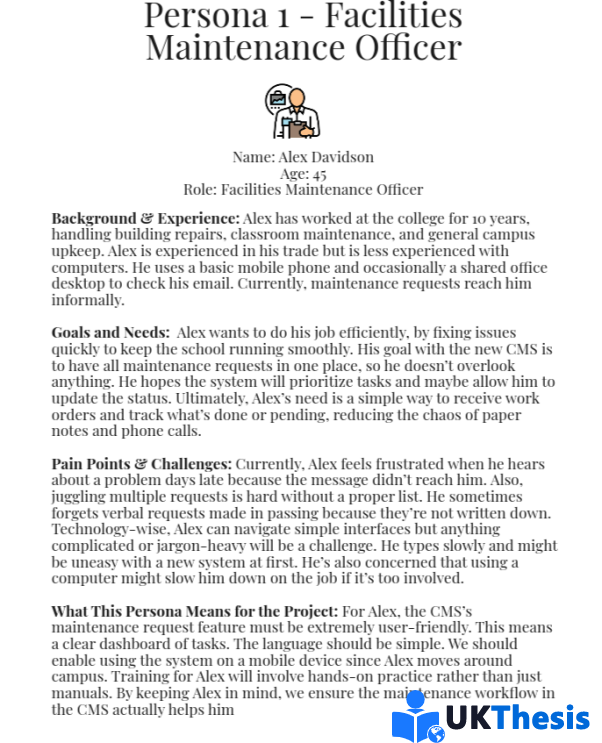
Persona 1 – Facilities Maintenance Officer
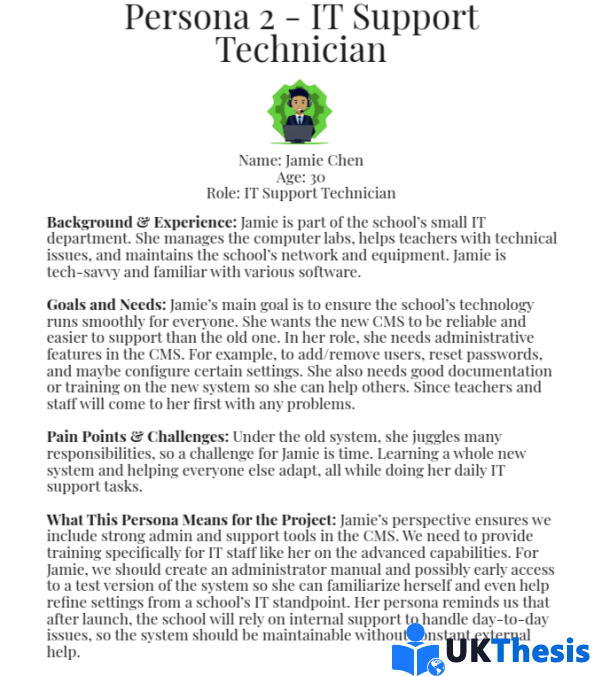
Persona 2 – IT Support Technician
3.2.User Stories
From the personas and scenarios, user stories are derived to capture how different users will use the system.
User Story for Persona 1 – Facilities Maintenance Officer
As a Facilities Maintenance Officer, I want to submit and update maintenance work orders in the CMS so that I can track all facility issues without paperwork.
User Story for Persona 2 – IT Support Technician
As an IT Support Technician, I want to create and manage user accounts and monitor server performance so that the CMS runs reliably and securely for all users.
General User Stories
As a Teacher, I want to send announcements to my class and book a classroom for an after-school event so that students receive timely information and resources are reserved when needed.
As a Student, I want to view my personal timetable and receive notifications of new announcements so that I can stay organized and not miss any classes or school news.
As a Parent, I want to access my child’s timetable and school announcements through the CMS so that I can keep informed about their school activities and progress.
As a School Administrator, I want to generate reports on room usage and maintenance request statistics so that I can make data-driven decisions about resource planning.
Each user story ties a user role to a system function and its value. From these, the project team can identify the steps needed to fulfill the user’s goals.
3.3.Use Case Diagrams
The interactions implied by the user stories with UML use case diagrams are created. These diagrams complement the user stories by illustrating which roles engage with each function of the system (Harley 2015).
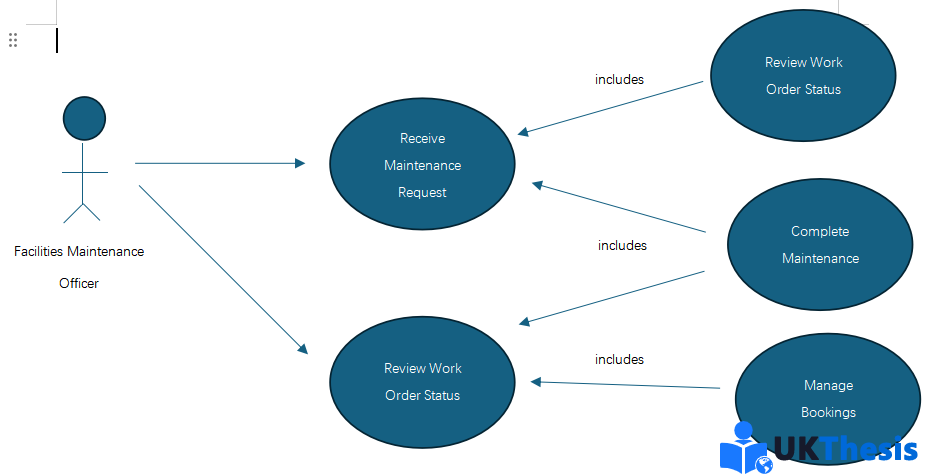
Figure 1. Use Case Diagram by Facilities Maintenance Officer
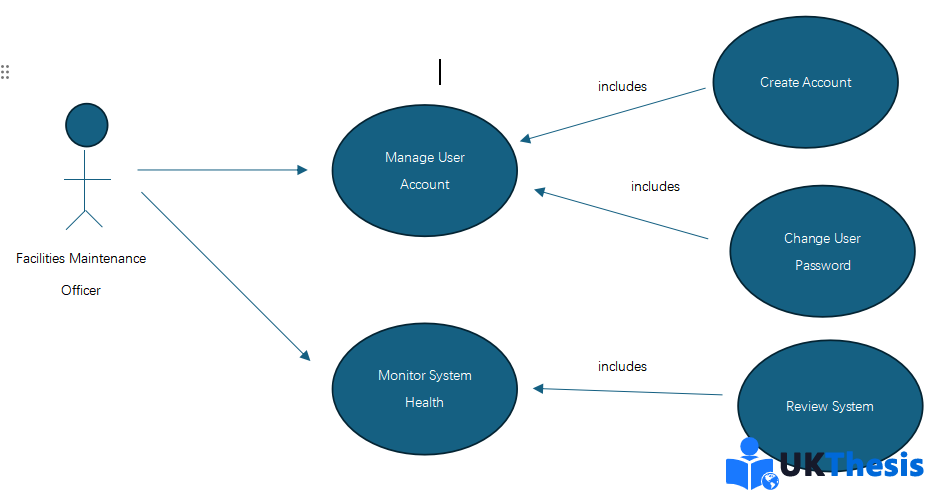
Figure 2. Use Case Diagram by IT Support Technician
4.Test Plan (Quality Assurance)
A structured test plan will ensure all critical features work correctly. The plan covers the features to test, testing methods, schedule, and roles.
4.1.Features to be Tested
User Authentication and Access Control: Verify login/logout, password reset, and role-based permissions.
Maintenance Request Workflow: Test submitting, editing, and closing maintenance requests, including notifications to involved users.
Booking System: Test the room/equipment reservation process, conflict checking, and cancellation.
Messaging/Notification System: Test sending announcements, real-time notifications, and the inbox interface for different user roles.
These features cover both routine and critical functionality. Each will have detailed test cases outlining steps, expected results, and pass/fail criteria.
4.2.Testing Methods
Unit and Integration Testing: Developers will write and run tests for individual components such as booking API and authentication modules as they code. Automated unit tests will ensure logic correctness.
System Testing (Functional): Quality Assurance personnel will perform manual functional tests on each feature such as submitting a maintenance request to confirm it meets requirements. Exploratory or ad-hoc testing will also be done to catch unexpected issues.
Usability Testing: The team will conduct usability testing sessions with representative end-users. Observing them as they perform common tasks such as submitting request will identify any usability issues.
Performance Testing: The team will simulate multiple users to test response times under load, particularly for login, booking, and data retrieval functions. This ensures non-functional performance requirements are met.
User Acceptance Testing (UAT): At the end of development, selected staff (including IT, teachers, and facilities representatives) will perform acceptance testing in a staging environment. They will use the system “as if live” and provide feedback on any bugs or needed improvements.
Regression Testing: After fixes, QA will re-test features to ensure changes do not break existing functionality. Critical tests (e.g. login, booking) will be re-run after each update cycle.
4.3.Timeframes
Term 3, Weeks 5–10 (Aug–Sep 2025): Development concludes; initial system testing begins. Unit tests and developer testing occur immediately after feature completion. By mid-Term 3, a prototype with core features will be ready for in-house testing.
Term 4, Weeks 1–8 (Oct–Nov 2025): Full system testing is performed. QA executes test cases for all features. Early in Term 4, we conduct usability tests with select users. In late Term 4, user acceptance testing is conducted as described in the plan.
Term 4, Week 9–10 / December 2025: Final regression testing and bug fixes. The system is hardening for go-live. Any defects from UAT are resolved. The final acceptance test is completed by the IT department.
Go-Live (end Dec 2025): After final testing and training sessions in late December, the system is deployed for live use with the start of Term 1 2026.
4.4.Roles and Responsibilities
Developers: Responsible for unit testing their code and fixing defects they discover. They also assist in integration testing as components are combined.
Quality Assurance Team (QA): Creates and executes test plans/cases for system and regression testing. Logs defects in the issue-tracking system and verifies fixes.
Project Manager: Oversees testing schedule, ensures resources (testers, hardware) are available, and tracks progress of test activities. Decides on go/no-go based on test results.
IT Support Technician (Project Team): Leads deployment of test environments and performs system administration tasks during testing. Supports developers and testers with technical setup.
Selected End Users (Teachers, Admin Staff, Facilities Staff): Participate in usability and acceptance testing, providing feedback on functionality and reporting any issues.
Students/Parents (if involved in final UAT): May be invited to a pilot group to ensure that their use cases work as intended.
5.Concluding Statements
In summary, this technical plan outlines a comprehensive approach to redeveloping the Community College’s CMS. By defining clear goals, scope, and assumptions, and by detailing system features and requirements, the project ensures alignment with stakeholder needs. The two personas and user stories keep the team focused on real user benefits, while the use case diagrams provide visual clarity of system interactions. Finally, the outlined test plan assigns responsibilities and sets a realistic schedule to verify quality. Through this structured approach that emphasises stakeholder involvement, thorough design, and rigorous testing. The new CMS will be delivered on time and deliver substantial improvements. Once live, it will offer a one-stop platform that enhances communication, streamlines administrative tasks, and supports the college community effectively.
6.References
AltexSoft (2023) Functional and Nonfunctional Requirements: Specification and Types. Accessed 27 April 2025 https://www.altexsoft.com/blog/functional-and-non-functional-requirements-specification-and-types/
Harley, A. (2015) Personas Make Users Memorable for Product Team Members. Nielsen Norman Group. Accessed 27 April 2025 https://www.nngroup.com/articles/persona/
School Webmasters (2023) CMS for Schools: Benefits and Challenges. Accessed 27 April 2025 https://www.schoolwebmasters.com/cms-for-schools